How Calendly Uses In-App Popups to Drive Feature Adoption
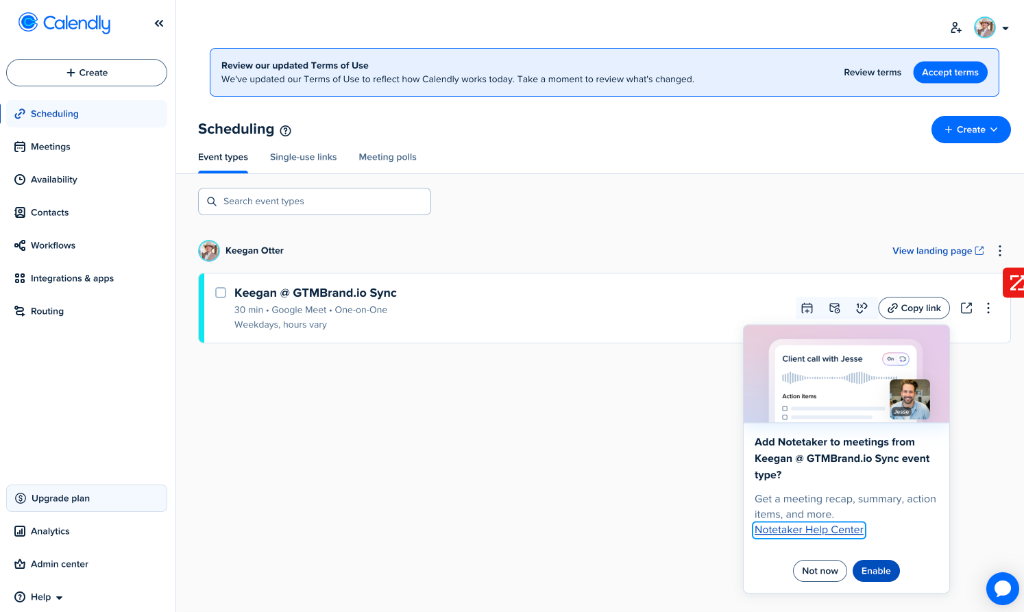
There's a popup inside Calendly's product dashboard that every product marketer should study. When you're managing your event types — the core of how you use Calendly — a subtle card slides into the bottom-right corner: "Add Notetaker to meetings from Keegan @ GTMBrand.io Sync event type?"
Below it: "Get a meeting recap, summary, action items, and more." Two buttons sit at the bottom: a muted "Not now" and a bold blue "Enable."
This is in-app popup marketing at its best — contextual, timely, and designed to drive feature adoption rather than lead capture. It's a playbook used by product marketers across leading SaaS companies, and it's one you shouldn't sleep on.
The Strategy: Contextual Feature Adoption Popups
Calendly's Notetaker popup isn't a generic announcement that appears when you log in. It appears when you're managing an event type — the exact moment when you're thinking about how your meetings work. The popup asks: "Want to add AI-powered notes to this specific event type?"
This contextual relevance is what makes in-app feature popups so effective:
- Timing: The popup appears when the user is already engaged with the relevant workflow — not during onboarding when they're overwhelmed, and not via email when they're distracted.
- Specificity: The popup names the exact event type ("Keegan @ GTMBrand.io Sync") rather than making a generic pitch. This makes the offer feel personalized and actionable.
- Visual context: The header image shows what the Notetaker looks like in action — a waveform, a meeting interface, a participant named "Jesse" — so users immediately understand what they're enabling.
- Low-friction opt-in: The "Enable" button is one click. No settings page navigation, no configuration wizard — just instant activation.
Why In-App Popups Beat Email for Feature Adoption
Most SaaS companies announce new features via email. The problem: email is a channel of distraction. Your user is in their inbox, context-switching between a dozen threads, and your feature announcement competes with everything else demanding their attention.
In-app popups flip this dynamic. The user is already in your product, already in the workflow where the feature applies, and already in a mindset of getting work done. The popup meets them where they are.
The results speak for themselves:
- Higher activation rates: Users who see a feature popup in-context are far more likely to enable it than those who receive an email announcement.
- Faster time-to-value: One-click activation means the feature is enabled in seconds, not days after the user finally gets around to reading your email.
- Reduced churn risk: Features that get adopted stick. Users who activate new capabilities are more engaged and less likely to churn.
The Design Breakdown: What Makes This Popup Work
Calendly's popup is carefully designed to maximize adoption without being intrusive:
- Bottom-right placement: The popup sits in the corner of the dashboard — visible but not blocking the user's primary workflow. They can continue managing event types while the popup is present.
- Header image showing the product in action: Rather than describing the Notetaker feature in text, the popup shows it — a meeting interface with a waveform and participant. This "show, don't tell" approach reduces cognitive load.
- Benefit-driven body copy: "Get a meeting recap, summary, action items, and more" leads with outcomes, not features. Users immediately understand the value.
- Help Center link: The "Notetaker Help Center" link gives cautious users a path to learn more before enabling — reducing anxiety for users who want to research before committing.
- Asymmetric button design: The "Enable" button is solid blue (high contrast, draws the eye), while "Not now" is a muted outline button. This visual hierarchy nudges users toward adoption without forcing it.
- Soft dismissal: "Not now" (not "No thanks" or "Dismiss") leaves the door open — implying the offer may return later, which keeps the feature top-of-mind.
The Broader Playbook: Feature Adoption Popups Across SaaS
Calendly isn't alone in using this strategy. Leading SaaS companies use in-app popups as a core product marketing channel:
- Triggered by workflow context: The popup appears when the user is in the relevant workflow — managing event types, viewing a dashboard, completing an action — not on a random timer.
- Named and specific: The popup references the user's specific context (their event type name, their workspace, their data) rather than making a generic pitch.
- Visual-first: A screenshot or illustration of the feature in action reduces the distance between "what is this?" and "I want this."
- One-click activation: The CTA enables the feature immediately — no multi-step setup, no settings page detour.
- Soft opt-out: "Not now" or "Maybe later" keeps the feature in the user's consideration set without being pushy.
How to Replicate Calendly's Feature Adoption Popup
While Calendly's popup lives inside their product, the same principles apply to website-based feature promotion. With Upvert's Smart Popups, you can deploy feature adoption popups that:
- Trigger based on visitor behavior — show a feature popup only to visitors who've viewed a specific product page, indicating high intent for that capability.
- Reference the visitor's context — use website de-anonymization to personalize the popup with the visitor's company name or industry, making the offer feel specific rather than generic.
- Show, don't tell: Use a product screenshot or GIF in the popup header so visitors immediately see the feature in action.
- Lead with benefits: Copy like "Get a meeting recap, summary, action items, and more" outperforms feature-name headlines because it answers the "so what?" question.
- Offer a learn-more path: Include a help doc or demo video link for visitors who want to research before converting.
- Use asymmetric CTAs: Make the primary action visually dominant and the dismissal option muted — nudging without forcing.
Conclusion
Calendly's Notetaker popup is a textbook example of the in-app feature adoption playbook — and it's one that product marketers shouldn't sleep on. By triggering a contextual, visually-driven, one-click popup at the moment of highest relevance, Calendly turns feature announcements into feature activations.
Whether you're promoting a new product capability inside your app or on your website, the principles are the same: be contextual, be specific, show the value visually, and make activation frictionless. The companies that master this playbook don't just announce features — they drive adoption.