How Base44 Uses In-App Popups to Promote New Releases & Drive Product Adoption
When Base44 launched a cleaner, redesigned interface, they didn't bury the announcement in a release notes email or a blog post. They used an in-app feature release popup — a targeted, contextual modal displayed directly inside the product — to announce the new look to every user at the exact moment they were most engaged.
This is a textbook example of how leading AI platforms use in-app guides and feature release popups to drive product adoption, user enablement, and feature awareness at scale. And it's a strategy any team can replicate — without the enterprise price tag of platforms like Pendo or WalkMe.
What Are In-App Popups & Feature Release Modals?
In-app popups are contextual, non-intrusive overlays — modals, banners, or step-by-step walkthroughs — that appear inside your product to educate users, announce new features, and drive specific behaviors. Feature release popups are a specific type of in-app popup focused on announcing new capabilities, product updates, or interface redesigns to your existing user base.
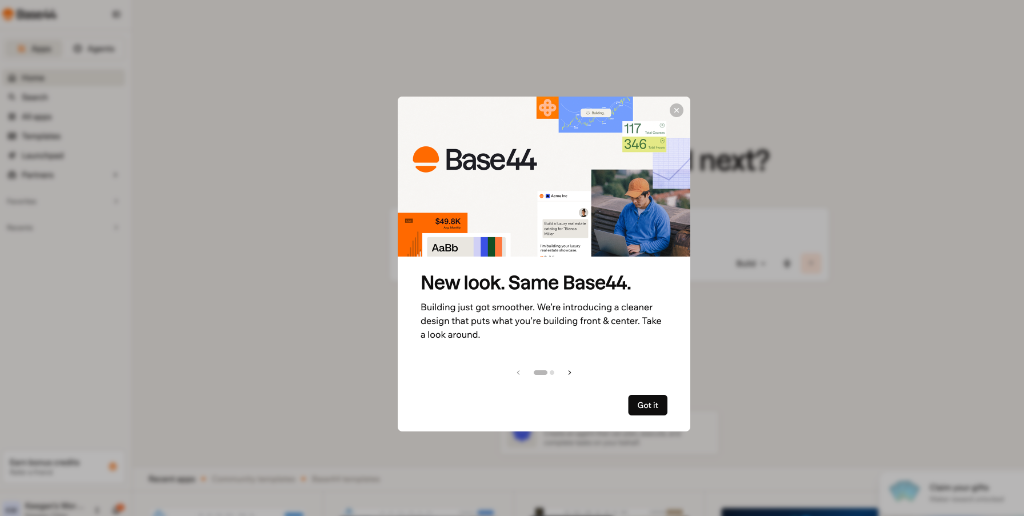
Base44's popup is a perfect example: when a user opens the platform, a clean, well-designed modal announces "New look. Same Base44." with a visually rich collage header, a concise message about the redesign, and a clear "Got it" call-to-action.
This approach is powerful because it:
- Meets users where they are: The announcement appears inside the product, not buried in an inbox
- Drives immediate awareness: Users see the update the moment they log in — no email open required
- Scales enablement: Every user sees the announcement without requiring a 1:1 training session
- Boosts feature adoption: Users learn about new capabilities the moment they're available
- Reduces support tickets: Proactive education prevents confusion and reduces inbound questions
The Base44 Playbook: Anatomy of an Effective Feature Release Popup
Base44's in-app popup hits all the right notes. Let's break down why it works:
1. Visually Rich Header Image
The top of the modal features a collage of UI elements — the Base44 logo, a map snippet, numerical data badges, a graph, a typography block, and a photograph of a person using a laptop outdoors. This immediately signals that the announcement is about a broad platform update, not a single feature. The collage creates visual interest and sets the tone: something new and improved is here.
2. Benefit-Driven Headline
"New look. Same Base44." — the headline is short, punchy, and reassuring. It tells the user that while the interface has changed, the product they know and love is still the same underneath. This reduces anxiety about learning a new interface and frames the redesign as an improvement, not a disruption.
3. Concise, User-Centric Body Copy
"Building just got smoother. We're introducing a cleaner design that puts what you're building front & center. Take a look around." — the body copy is just two sentences. It explains what changed (a cleaner design), why it matters (it puts your work front and center), and what to do (take a look around). No jargon, no feature lists, no information overload.
4. Pagination for Multi-Step Guides
Below the body copy, a row of pagination dots with left and right arrows indicates that this popup is part of a multi-step guide. Users can navigate through multiple slides to learn about different aspects of the redesign at their own pace. This is a best practice for feature release popups: break complex updates into digestible, sequential steps rather than overwhelming users with everything at once.
5. Clear, Single CTA: "Got it"
The "Got it" button — solid black with white text, positioned at the bottom right — is the only action required. It acknowledges the announcement and dismisses the modal. By keeping the CTA simple and low-friction, Base44 ensures users actually engage with the popup rather than dismissing it immediately. There's no "Learn more" link to pull them away from the product, no "Schedule a demo" — just a clean acknowledgment that lets users get back to building.
Why In-App Popups Matter for Product Teams
In-app popups and feature release modals solve one of the hardest problems in SaaS: getting users to discover and adopt new features. Research shows that the average SaaS product has dozens of features that the majority of users never touch. When you launch a new capability or redesign, email announcements have open rates of 20-30% at best — meaning 70%+ of your users never see the news.
In-app popups flip this dynamic. Instead of hoping users check their inbox, you meet them where they already are: inside your product, actively engaged. The result is dramatically higher awareness, faster adoption, and lower support burden.
Platforms like Upvert's in-app guides make this accessible to any team — no engineering resources required, no enterprise contracts, no weeks of implementation.
Best Practices for Feature Release Popups (From Base44's Example)
Here's what makes Base44's popup so effective — and how you can replicate it:
- Use a visual header: A collage or screenshot immediately grabs attention and signals what the announcement is about
- Keep the headline short and reassuring: "New look. Same Base44." is four words. It sets expectations without overwhelming
- Write two sentences max for the body: Say what changed, why it matters, and what to do. That's it
- Use pagination for complex updates: Break multi-feature announcements into slides so users can navigate at their own pace
- Use a single, low-friction CTA: "Got it" works better than "Learn more" or "Schedule a demo" for broad awareness announcements
- Don't overuse them: Reserve in-app popups for significant releases. If users see one every time they log in, they'll start dismissing without reading
- Target and segment: Show different popups to different user roles, plan types, or account segments for maximum relevance
How to Replicate Base44's In-App Popup Strategy
Base44 likely built their feature release popup using an in-app guidance platform. But you don't need a dedicated Digital Adoption Platform (DAP) like Pendo or WalkMe — which start at $15,000–$25,000/year — to achieve the same result.
With Upvert's in-app guides, you can create the same type of feature release popup in minutes:
- Add the Upvert snippet once via Google Tag Manager or your header — no engineering sprint required
- Build your popup visually with the no-code builder: add a header image, headline, body copy, and CTA
- Add pagination if your update has multiple parts — users navigate with arrows or dots
- Target by user role, company, plan type, or behavior so the right users see the right announcement
- Track impressions, clicks, and dismissals to measure engagement and iterate
And unlike Pendo or WalkMe, Upvert gives you both in-app guides and website popups in one platform — so you can announce new releases to existing users inside your product and capture new visitors on your public website with a single tool, starting at just $1,500/year.
The Bottom Line
Base44's "New look. Same Base44." popup is a masterclass in feature release communication: visually engaging, concisely written, reassuringly framed, and frictionless to dismiss. It announces a significant product change without disrupting the user's workflow — and it ensures every user sees the news, not just the 20% who open release notes emails.
Whether you're launching a redesigned interface, a new feature, or a major product update, in-app popups are the most effective way to drive awareness and adoption. And with modern no-code tools like Upvert's in-app guides, any team — from startups to enterprises — can deploy them in minutes, not months.
Ready to launch your own in-app feature release popups? Start for free with Upvert and deploy your first in-app guide in 5 minutes — no code, no engineering, no enterprise contract required.