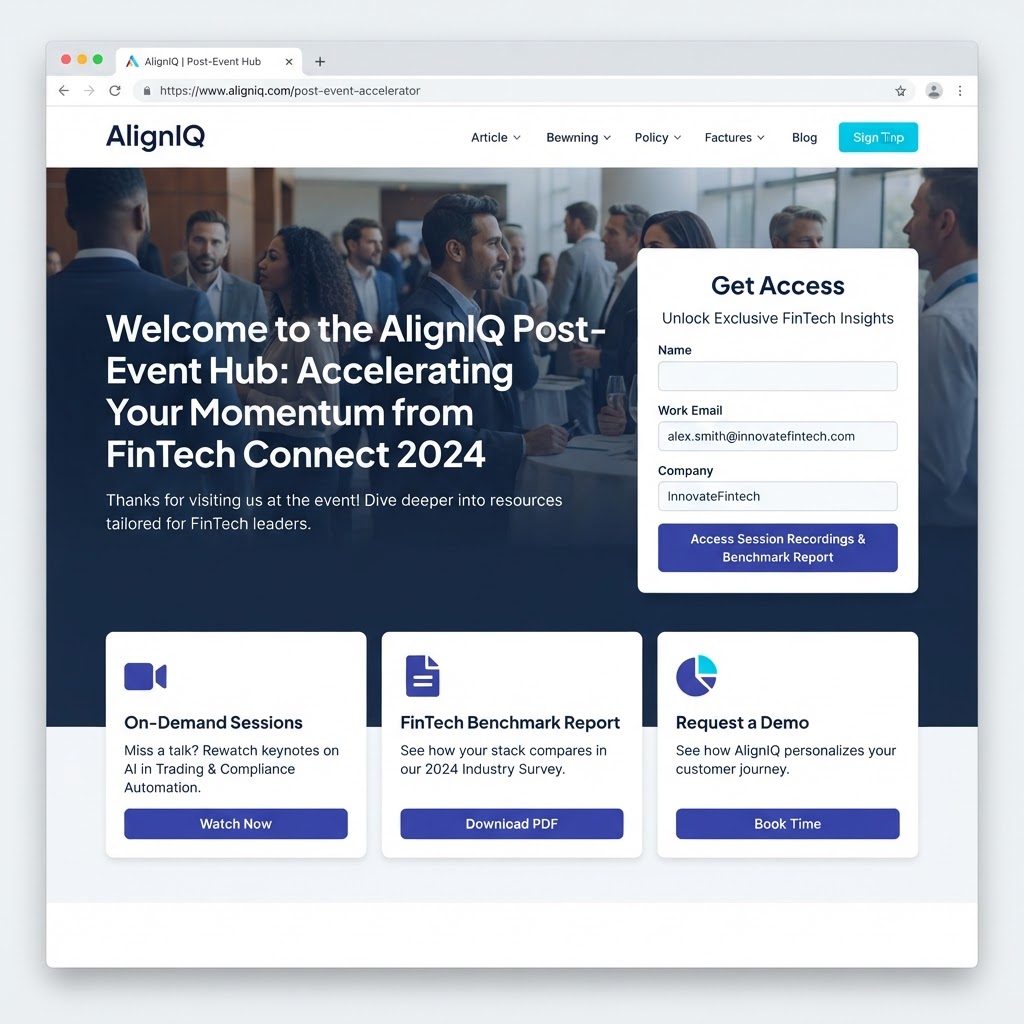
Post-Event Follow-Up: Turning Conference and Webinar Traffic Into Pipeline With Microsites and Popups
Short answer: Send event attendees to an event-specific microsite, use intent-triggered popups to offer a clear next step, and use visitor identification to find accounts that visited after the event without ever filling out a form. Then follow up within days, while the conversation is still fresh. Most event ROI is lost in the gap between the booth and the first email.
The Event Follow-Up Gap
Q4 is conference, webinar, and year-end planning season for many B2B teams. Events generate scans, QR-code visits, and a bump in website traffic, but typically only a fraction of those people appear in your CRM. The rest read a page or two and disappear. Treating the event list as the whole audience ignores everyone who engaged quietly.
Step 1: Build One Microsite per Event
A generic homepage wastes the context attendees just had. Create a personalized microsite for each event that:
- References the event by name and the topic you discussed.
- Offers the one asset you promised, such as a demo recording, checklist, or benchmark.
- Has a single call to action, like booking a 20-minute follow-up.
Point booth QR codes, badge-scan emails, and webinar thank-you pages to the same URL so you can measure the whole event in one place.
Step 2: Segment by Attendee Type
Not every attendee is a buyer. Consider three variants:
- Target accounts from your ABM list: lead with a direct meeting offer.
- Practitioners who attended a session: lead with educational content.
- Partners and peers: lead with a partnership or referral path.
Account-tier targeting lets the same page show the right message to each group.
Step 3: Add Intent-Triggered Popups
Use intent-triggered popups to guide people who are interested but undecided:
- Time on page over 60 seconds: offer a short walkthrough video.
- Scroll past 50 percent: offer the event slide deck by email.
- Exit intent: offer to book a call next week.
- Returning visitor: acknowledge they were at the event and offer a meeting.
Keep one popup per session. Event visitors are already warm, so subtle works better than loud.
Step 4: Find the Accounts That Never Filled Out a Form
This is where website de-anonymization pays off. It identifies many visiting companies using IP-to-company matching and reverse DNS, and can add person-level data through Warmly. In the week after an event, review which target accounts hit your event microsite or pricing page, even if they never submitted anything. Match rates depend on your audience, so use identification to prioritize, not to build a complete list. Learn more in how identification works.
Step 5: Follow Up Fast and Specifically
Set a simple cadence:
- Day 0-1: thank-you email linking the microsite.
- Day 2-3: SDR outreach to identified target accounts, referencing the page they viewed.
- Day 7: one educational follow-up to everyone else.
Sync identified activity to HubSpot or Salesforce, or alert reps in Slack, so the signal reaches people who can act on it.
Measuring Event ROI
Track microsite visits per event, meetings booked per visit, identified accounts that were not on your scan list, and pipeline influenced within 60 to 90 days. Comparing events on these metrics makes budget decisions much clearer.
Frequently Asked Questions
How do you follow up with trade show leads effectively?
Send attendees to an event-specific microsite, respond within days, and tailor the message to their role and account tier rather than sending one generic email.
Can I identify event visitors who did not fill out a form?
Often yes at the company level. Website de-anonymization matches many visiting companies, though match rates vary by audience and network.
Should I use popups on an event landing page?
Yes, sparingly. One behavior-triggered offer, like a walkthrough or meeting link, helps without annoying warm visitors.
How long does it take to launch an event microsite?
Upvert installs in about five minutes, and an event microsite can usually be launched in a short working session.
Planning your next event or year-end push? Book a demo or start for free. See pricing.