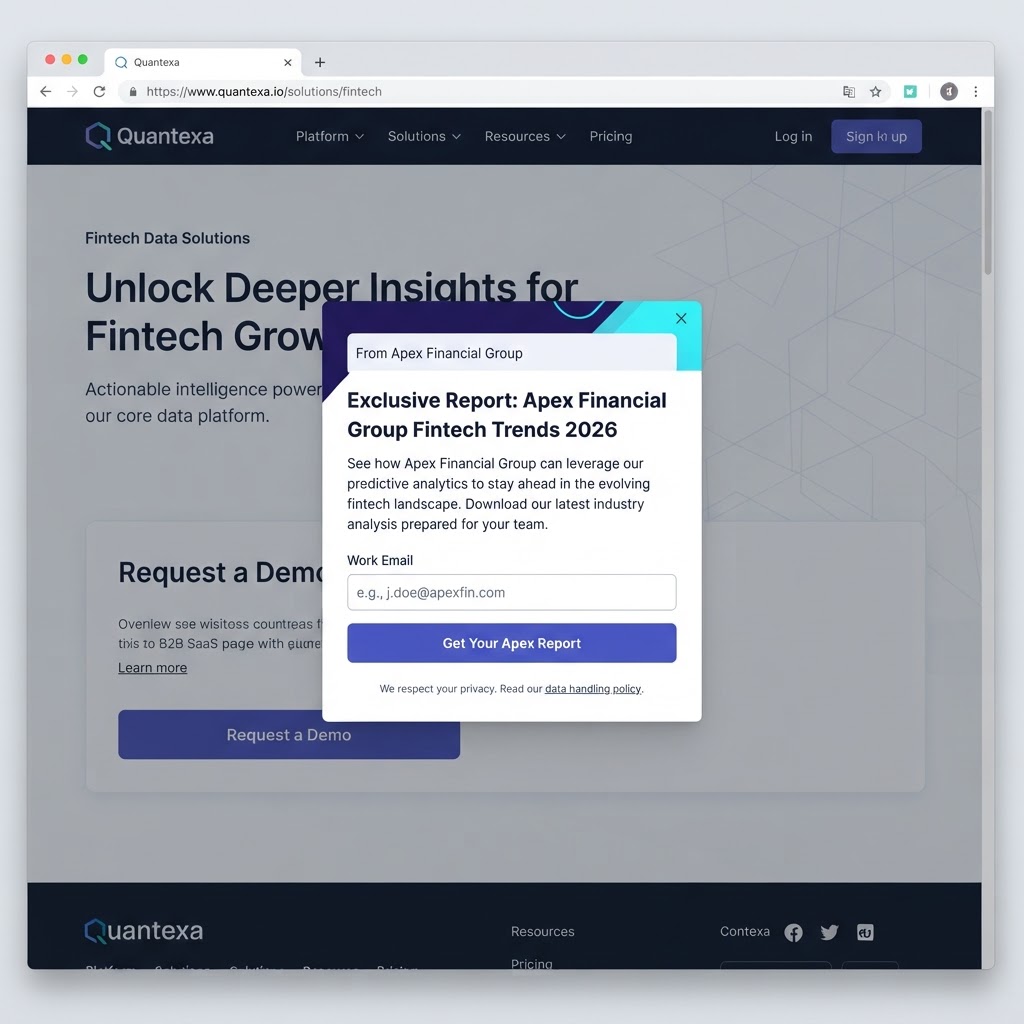
Pricing Page Popups for B2B: An Intent-Triggered Playbook That Respects Buyers
Short answer: The most effective B2B pricing page popups are not shown to everyone. They fire on intent signals such as repeat pricing-page views, time on the page, scroll depth, or exit intent, and they change based on who the visitor is. Show target accounts a direct path to a demo, show unidentified visitors a low-friction capture offer, and show existing customers nothing or an upgrade message.
Why the Pricing Page Deserves Its Own Strategy
Buyers who open your pricing page are usually comparing options and building a business case. They are also the visitors most likely to leave without filling out a form, because pricing answers one question and raises three more: Does it fit my team size? What does implementation involve? Who else uses it?
A well-timed popup answers one of those questions at the moment it appears. A badly timed one interrupts the reader in the first three seconds and gets closed. The difference is almost entirely trigger logic and relevance.
The Triggers That Signal Real Intent
Upvert's Smart Popups support the signals below. Combine two for higher precision.
- Repeat pricing-page views: a second or third visit in a short window suggests an active evaluation.
- Time on a high-intent page: thirty to sixty seconds of reading beats a flash visit.
- Scroll threshold: reaching the plan comparison or FAQ means the visitor is engaged.
- Exit intent: the cursor moving toward the browser chrome is a last chance to offer something useful.
- Returning visitor or CRM status: a contact tied to an open opportunity needs a different message than a stranger.
Match the Message to the Visitor
Target accounts: the account-based demo prompt
When de-anonymization identifies the visitor's company as one on your target list, show an Account-Based Demo popup that references their situation and links straight to a calendar. Identification works through IP-to-company matching and reverse DNS, with person-level detail available through Warmly. Because match rates vary with remote work and VPN use, treat identification as a signal to personalize, not a guarantee.
Unknown visitors: low-friction capture
For everyone else, offer something that makes sense next to a price: a pricing walkthrough, a plan-fit quiz, or a short product video. Keep the form to an email field.
Price-sensitive visitors: social proof
Exit-intent popups work well with a G2 reviews template or a short customer result, addressing the trust question that often sits behind a price objection.
Existing customers: stay out of the way
Use CRM data to suppress acquisition popups for current customers, or switch them to an upgrade or expansion message.
Four Rules for Popups That Buyers Do Not Resent
- One popup per session. Cap frequency so a visitor who dismissed it does not see it again.
- Delay it. Do not fire on page load. Let the visitor read first.
- Make dismissal easy. A clear close button builds trust and keeps mobile compliance clean.
- Offer value, not just a form. A calendar link, a calculator, or a relevant comparison page earns the click.
How to Test It
Run the popup against a holdout: show it to 80% of qualifying visitors and hold back 20%. Compare demo-request rate, meetings booked, and bounce rate on the pricing page over four weeks. Review by segment so you can see whether the account-based prompt is working for target accounts even if overall lift is modest. Our popup trigger benchmark and guide to how intent-triggered popups fire cover the mechanics.
What It Costs and How Long It Takes
Upvert goes live in about five minutes, and the Conversions Unlocked plan starts at $99/month with unlimited popup impressions and a 14-day free trial, enough time to run your first holdout test.
Frequently Asked Questions
Should I put a popup on my B2B pricing page?
Yes, if it is triggered by intent and tailored to the visitor. Avoid popups that fire immediately on page load or show to every visitor.
What is the best trigger for a pricing page popup?
Repeat pricing-page views combined with time on page is a strong signal. Exit intent works well as a fallback for visitors who leave without engaging.
How do I avoid annoying visitors?
Limit to one popup per session, delay it, make it easy to close, and suppress it for existing customers.
Can popups be different for target accounts?
Yes. With visitor identification, Upvert can show an account-based demo popup to target accounts and a lead-capture popup to everyone else.
Try it on your own pricing page: book a demo or start your 14-day free trial.