How to Sync De-Anonymized Website Visitors Into HubSpot and Salesforce: A Practical Integration Guide
Website de-anonymization only creates value once identified visitors reach your CRM. Upvert connects natively to HubSpot with bi-directional, real-time sync, and to Salesforce, Outreach, Apollo, and Slack via webhook, pushing company identity, page views, popup interactions, and UTM data into existing contact and account records without manual exports. Here's how the sync actually works and what to check before you turn it on.
Why Visitor Identity Needs to Live in the CRM, Not Just a Dashboard
A de-anonymization tool that only shows identified visitors in its own dashboard creates a second source of truth your sales and marketing teams have to remember to check. The more useful pattern is treating de-anonymized visitor data as an enrichment layer on records your team already works in daily — the CRM. When a target account's traffic and popup engagement show up as fields on a contact or account record, sales reps see intent signals inside the tool they're already using for outreach, and RevOps can score or route leads based on that behavior automatically.
What Syncs to HubSpot
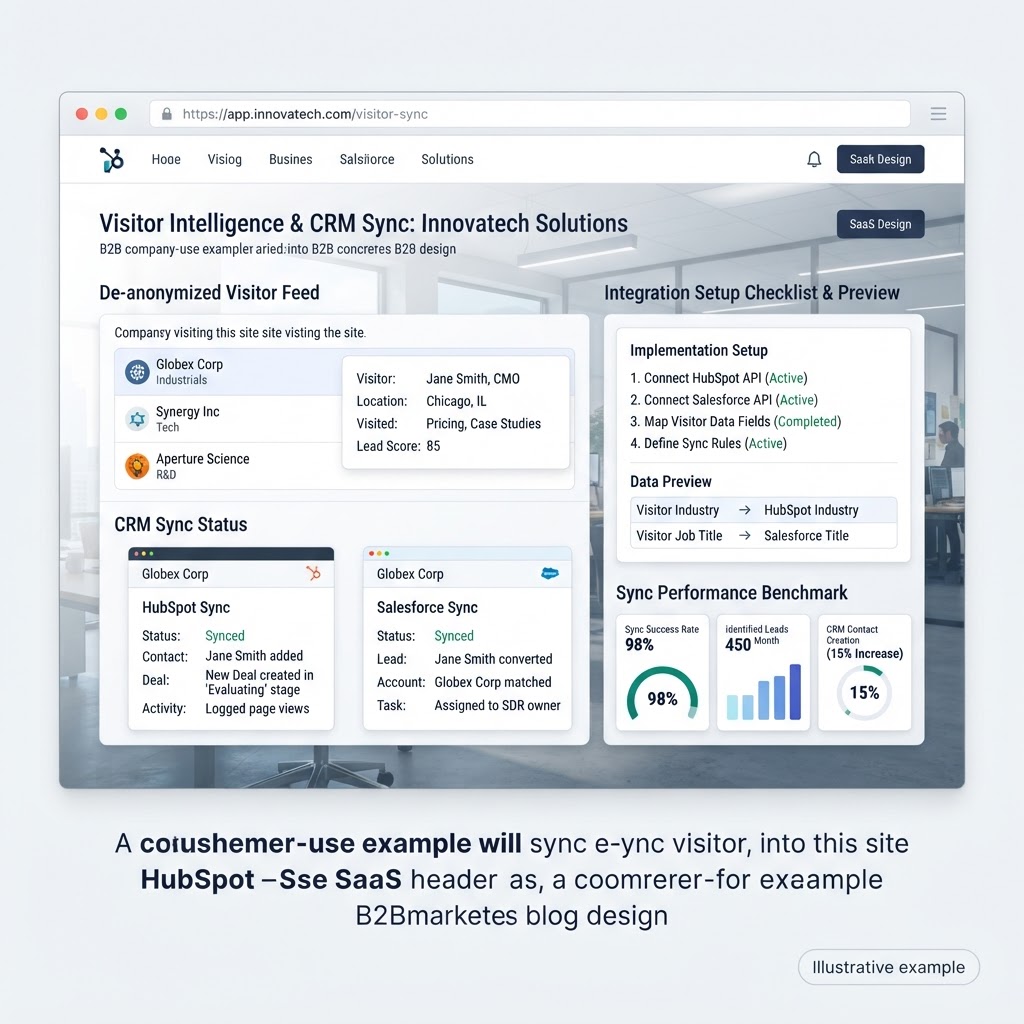
Upvert's HubSpot integration is native and bi-directional, meaning data flows both ways in near real time. Fields typically populated on contact and company records include:
- Page views and session counts
- Popup interactions — impressions, hovers, and clicks
- UTM parameters (source, medium, campaign) tying visits back to the originating channel
- Last-seen timestamp, so sales can see recency alongside frequency
Because the sync is bi-directional, HubSpot lifecycle stage and lists can also feed back into Upvert's targeting — for example, showing a different popup to a contact HubSpot already marks as an active opportunity than to a brand-new anonymous visitor from the same account.
What Syncs to Salesforce and Other Tools
Salesforce, Outreach, Apollo, Gmail, Instantly, Google Ads, Clay, Warmly, Smartlead, and Microsoft Teams connect via webhook or CSV rather than a native two-way sync. In practice this means identified-visitor events — a target account landing on the pricing page, or a known contact triggering a popup — can push a webhook payload into Salesforce to update a lead or account record, post a Slack or Teams alert to the account owner, or add a contact into an Outreach or Instantly sequence based on real-time website behavior.
Setting Up the Integration: What to Confirm First
Before connecting Upvert to your CRM, confirm three things: first, which fields on your HubSpot or Salesforce objects should map to Upvert's visitor and popup data, since mismatched field types are the most common setup issue; second, whether your CRM has existing workflows or scoring rules that should trigger off the new fields, so de-anonymization data starts driving routing and prioritization on day one instead of sitting unused; and third, who owns the Slack or Teams alert channel for high-intent account visits, so notifications reach the right rep rather than a shared channel nobody watches.
What Good Looks Like Once It's Running
A working setup means a sales rep can open a target account in Salesforce or HubSpot and see, without leaving the CRM, that the account visited the pricing page twice this week, engaged with a popup about a specific feature, and hasn't been contacted in nine days. That's the difference between de-anonymization as a novelty dashboard and de-anonymization as an operational input to pipeline — the CRM sync is what makes it the latter.
Frequently Asked Questions
Does Upvert integrate natively with HubSpot?
Yes, with bi-directional, real-time sync — visitor and popup data flows into HubSpot, and HubSpot lifecycle stage and list data can inform Upvert's on-site targeting.
How does Upvert connect to Salesforce?
Via webhook or CSV rather than a native two-way integration, pushing identified-visitor and popup-engagement events into Salesforce records and workflows.
What other tools does Upvert integrate with?
Outreach, Apollo, Gmail, Instantly, Google Ads, Clay, Warmly, Smartlead, and Microsoft Teams, in addition to native HubSpot and webhook-based Salesforce connectivity.
What data gets synced to the CRM?
Company identity, page views, session counts, popup impressions and clicks, UTM parameters, and last-seen timestamps, mapped onto existing contact and company records.
Do we need engineering resources to set up the CRM sync?
No. Upvert's integrations are built to connect without custom development, though field mapping and workflow triggers should be reviewed by whoever owns your CRM configuration.
Ready to get de-anonymized visitor data into your CRM? See all integrations, start a free trial, or book a demo of Upvert.